
The Quiet Renaissance of Terminal User Interfaces
The Quiet Renaissance of Terminal User Interfaces
Introduction: The Charm of Black Screens
Let me confess something: I spend most of my workday staring at black screens with colored text. Not because I'm nostalgic for the 1980s, but because those screens make me faster.
While the tech industry rushes toward flashier interfaces—Electron apps that consume 500MB of RAM to display a todo list, web apps with loading spinners that last longer than my coffee breaks—a quiet revolution has been happening in the terminal. Developers are rediscovering an old friend: the Terminal User Interface, or TUI.
You've probably encountered TUIs without realizing it. Ever used htop to check your system resources? That's a TUI. Scrolled through files with ranger? TUI. Managed Git commits with lazygit? You guessed it—TUI.
But what's driving this renaissance? Why are developers choosing text over graphics in 2025? Let me walk you through it.
What Exactly Is a TUI?
Before we dive deeper, let's clarify what we're talking about.
A Terminal User Interface (TUI) is a text-based interface that runs inside your terminal emulator. Unlike pure command-line interfaces (CLIs) where you type commands and get text output, TUIs provide interactive, visual elements—menus, panels, progress bars, even mouse support—all rendered with text characters.
Think of TUIs as the middle ground between two extremes:
| Interface Type | Example | Interaction Style |
|---|---|---|
| CLI | git commit -m "message" | Type commands, get text output |
| TUI | lazygit | Navigate with keyboard, visual feedback |
| GUI | GitHub Desktop | Point and click with mouse |
TUIs inherit the best qualities of both worlds: the speed and keyboard-driven efficiency of CLIs with the discoverability and visual structure of GUIs.
The Rise and Fall (and Rise) of Text Interfaces
Text-based interfaces aren't new—they're ancient by computing standards. Before Windows and macOS, all computer interaction was text-based. Early programs like vi, pine, and lynx were TUI applications before the term existed.
Then came the GUI revolution. Windows, Mac, and the web convinced us that clicking was superior to typing. Text interfaces became "old-fashioned," relegated to server administration and nostalgic hackers.
But something interesting happened around 2015. A new generation of developers, raised on GUIs, started building TUI applications. Not out of nostalgia, but out of frustration with modern software.
The complaints were familiar:
- "Why does Slack need 1GB of RAM?"
- "Why does my IDE take 30 seconds to start?"
- "Why do I need to take my hands off the keyboard to click one button?"
The solution? Go back to basics—but with modern sensibilities.
Why Developers Are Choosing TUIs in 2025
1. Speed That Actually Matters
TUI applications start instantly. There's no Electron runtime to initialize, no framework to bootstrap, no assets to download. When you type lazygit, you're working within milliseconds.
This isn't just about saving a few seconds. It's about cognitive flow. Every time an application makes you wait, it breaks your concentration. TUIs remove that friction entirely.
As one developer put it: "Terminal apps have faster response time than GUIs. That's not an opinion—it's physics."
2. Resource Efficiency
In an era where laptops ship with 32GB of RAM and developers still complain about memory, TUIs stand out by using almost nothing.
| Application | Type | Typical RAM Usage |
|---|---|---|
| VS Code | GUI (Electron) | 300-800 MB |
| Slack | GUI (Electron) | 400-1000 MB |
| Docker Desktop | GUI | 2-4 GB |
| lazygit | TUI | 20-50 MB |
| lazydocker | TUI | 30-60 MB |
| btop | TUI | 10-30 MB |
This matters especially when you're SSH'd into a remote server, running multiple tools simultaneously, or simply tired of your laptop's fan screaming for mercy.
3. Keyboard-First Means Hands-Stay-Put
Here's an uncomfortable truth: reaching for the mouse breaks your typing flow. Every time you move your hand from the keyboard to click something, you're losing momentum.
TUIs are designed for keyboard-first interaction. Navigation happens with arrow keys or vim-style bindings (hjkl). Actions are triggered with single keypresses. Your hands never leave home row.
For developers who spend 8+ hours daily typing, this isn't just convenience—it's ergonomics.
4. SSH and Remote Work
Try running VS Code on a server you've SSH'd into. You'll need to set up port forwarding, install extensions, configure remote development—it's a whole ordeal.
Now try running lazygit on that same server. You just... run it. It works. The interface travels through SSH like any other text.
In an increasingly remote-first world, where developers jump between local machines, cloud VMs, and containers, TUIs are the only interfaces that work everywhere without configuration.
5. Focus and Minimalism
Modern GUIs are designed to show you everything at once. Multiple panels, notification badges, colorful buttons competing for attention—it's visual chaos optimized for feature discovery, not focused work.
TUIs embrace constraints. Limited screen space forces intentional design. You see what matters, nothing more. For developers with ADHD or anyone who struggles with digital distraction, this minimalism is therapeutic.
The TUI Renaissance: Tools That Changed the Game
Let's look at the TUI applications that sparked this renaissance and why they've gained devoted followings.
Lazygit: Git Without the Command Memorization
Repository: github.com/jesseduffield/lazygit
If you've ever had to Google "how to undo a git commit" or accidentally typed git checkout when you meant git switch, lazygit is for you.
Lazygit presents your Git repository as navigable panels—files, branches, commits, stashes—all visible at once. You stage files with spacebar, commit with c, push with P. The learning curve is measured in minutes, not days.
What makes it special:
- Visual staging: See exactly what's being staged, line by line
- Conflict resolution: Three-panel merge view without leaving the terminal
- Worktree support: Manage multiple branches simultaneously
- Custom commands: Extend with your own shortcuts
The creator, Jesse Duffield, describes it as "simple terminal UI for git commands"—but that undersells it. It's git for humans.
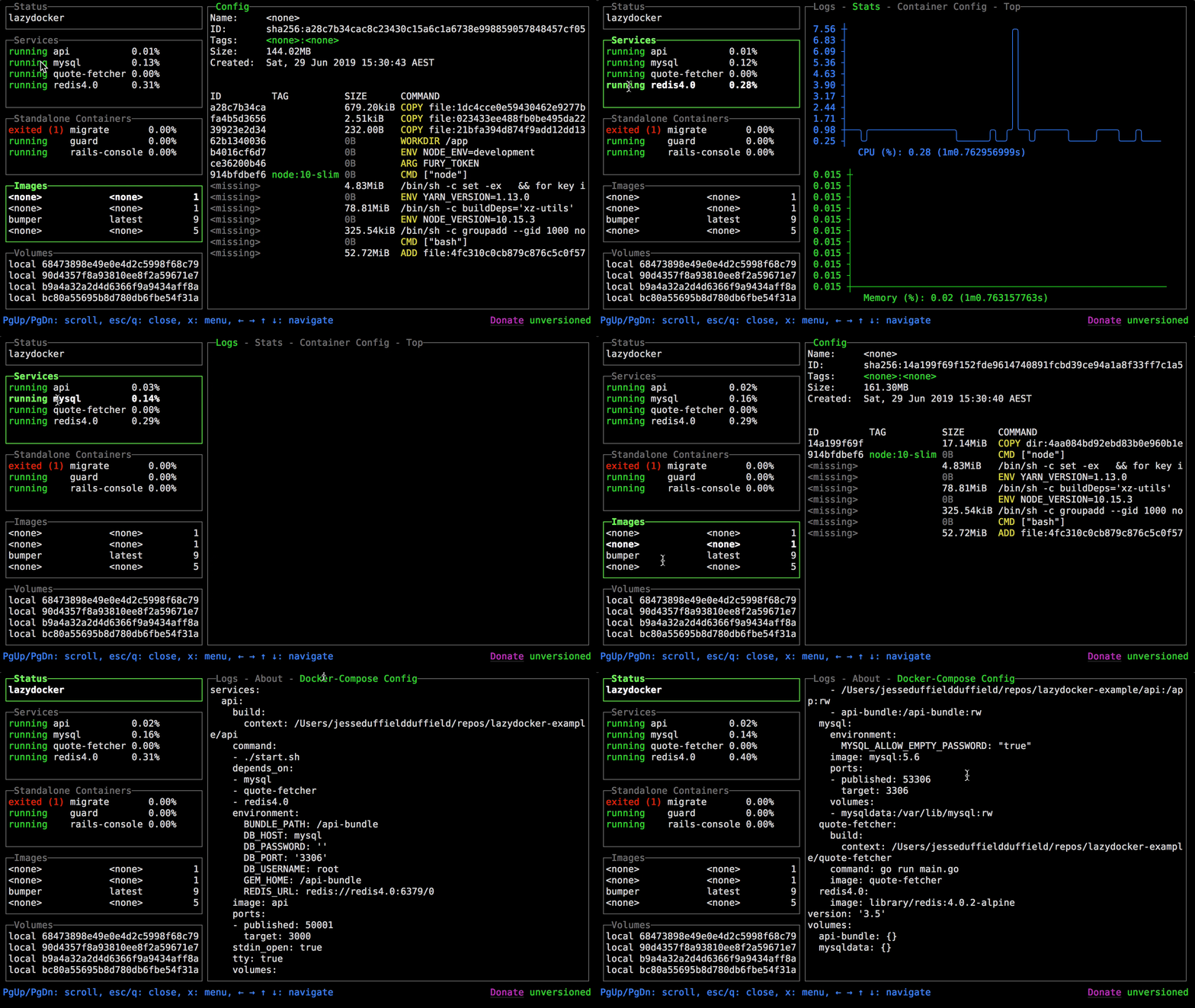
Lazydocker: Docker Without the Documentation Tab
Repository: github.com/jesseduffield/lazydocker
From the same developer comes lazydocker, applying the same philosophy to container management.
Instead of memorizing docker ps, docker logs -f, docker exec -it, you get a single interface showing all containers, their status, logs, and stats. Stopping, restarting, or shelling into a container is one keypress away.
Key features:
- Real-time log tailing: No more
docker logs -f container_name - Resource monitoring: CPU and memory usage at a glance
- Bulk operations: Manage multiple containers simultaneously
- Docker Compose integration: See your whole stack organized
For home lab enthusiasts and DevOps engineers alike, it's become indispensable.
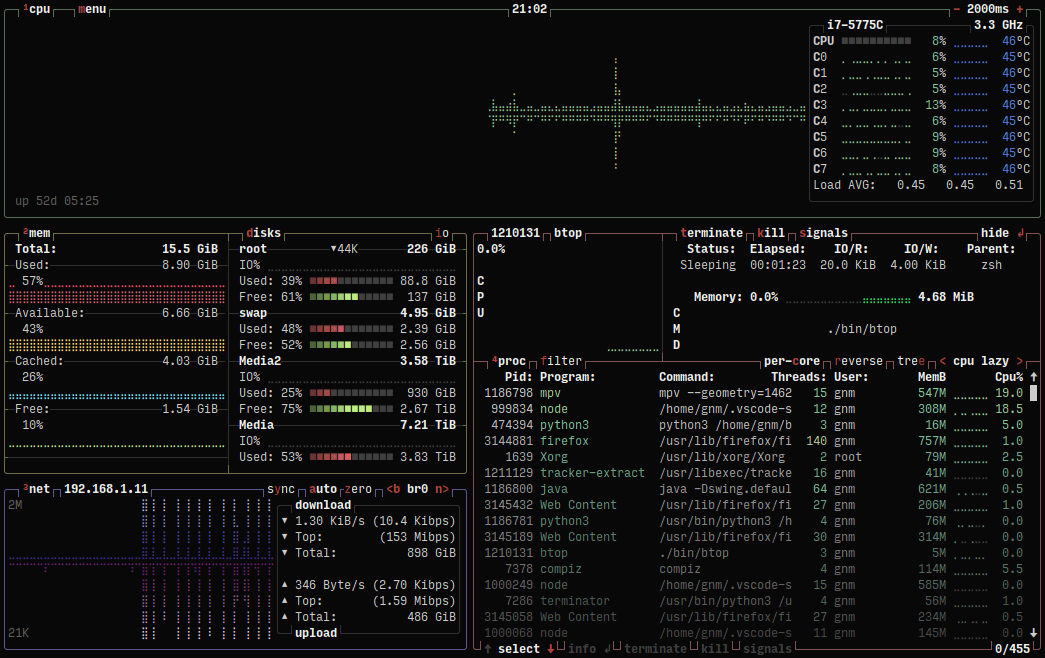
btop: System Monitoring as Art
Repository: github.com/aristocratos/btop
System monitors have existed since the dawn of Unix, but btop elevated the genre to an art form.
With colorful graphs, responsive layouts, and comprehensive metrics—CPU, memory, disk, network, processes—btop makes system monitoring almost enjoyable. It's the kind of tool you leave running on a secondary terminal just because it looks good.
Why developers love it:
- Beautiful by default: No configuration needed for a great experience
- Comprehensive metrics: Everything in one view
- Process management: Kill, nice, filter processes directly
- Customizable themes: Match your terminal aesthetic
k9s: Kubernetes for Humans
Repository: github.com/derailed/k9s
Kubernetes management from the command line is notoriously painful. kubectl get pods, kubectl describe, kubectl logs—each command requires remembering syntax and typing namespace flags.
k9s transforms Kubernetes management into something almost pleasant. Navigate pods, deployments, services with arrow keys. View logs, execute shells, delete resources—all without typing a single kubectl command.
For anyone working with Kubernetes clusters, k9s has become the default way to interact with them.

File Managers: ranger, nnn, yazi
The terminal file manager space has exploded with options, each with its own philosophy:
- ranger: Vim-style navigation with image previews (yes, images in the terminal)
- nnn: Minimal and blazingly fast, for purists
- yazi: Modern, written in Rust, with async everything
These tools let you navigate filesystems, preview files, perform batch operations—all faster than any graphical file manager could dream of.
Building TUIs: The Library Ecosystem
The TUI renaissance isn't just about using these tools—developers are building their own. Several libraries have made TUI development accessible:
For Python Developers
Rich and Textual (by the same author) have transformed Python terminal development. Rich makes beautiful terminal output trivial—tables, progress bars, syntax highlighting. Textual goes further, providing a full widget system for building complex TUI applications.
For Go Developers
Bubble Tea and Lip Gloss from Charm provide a delightful, functional approach to TUI development. The framework's design makes building interactive applications surprisingly pleasant.
For Rust Developers
Ratatui (a fork of the original tui-rs) powers many of the TUIs mentioned in this article. The Rust community has embraced TUI development with characteristic enthusiasm.
For JavaScript/TypeScript
Ink brings React's component model to the terminal. If you can build a React app, you can build a TUI with Ink.
TUI vs GUI: When to Choose What
TUIs aren't universally better—they're differently suited. Here's a honest assessment:
Choose TUI When:
- Speed is paramount: Every millisecond matters in your workflow
- Keyboard-first: You prefer keeping hands on home row
- Remote access: You frequently SSH into servers
- Resource constraints: Running on limited hardware
- Focus is essential: You need distraction-free interfaces
- Developer-focused: Your users are comfortable in terminals
Choose GUI When:
- Visual design work: Graphics, images, rich media
- Discoverability: New users need to explore features
- Complex data visualization: Charts, graphs, interactive elements
- Drag and drop: Spatial manipulation is core to the task
- Non-technical users: Your audience isn't terminal-comfortable
- Touch interfaces: Mobile or tablet users
The honest truth? Most developers use both. I use lazygit for version control but GitHub's web interface for pull request reviews. I use btop for quick checks but Grafana dashboards for team monitoring. The best interface depends on the task, the context, and personal preference.
The Future of TUIs
The TUI renaissance shows no signs of slowing. New projects appear weekly on GitHub, often written in Rust or Go—languages that produce fast, dependency-free binaries perfect for terminal tools.
Some trends to watch:
AI-Powered TUIs
As AI assistants become integral to development workflows, expect TUI interfaces for interacting with them. Typing a prompt, seeing streaming responses, reviewing diffs—all without leaving your terminal.
Hybrid Approaches
Tools like WezTerm and Kitty are blurring the line between terminal and GUI, supporting inline images, hyperlinks, and even GPU acceleration. TUIs built for these terminals can offer richer experiences while maintaining terminal compatibility.
Enterprise Adoption
Companies are discovering that TUI-based tools require less training for technical staff, work better over SSH, and integrate more easily into scripts and automation. Expect more enterprise-focused TUI development tools.
Conclusion: The Interface That Disappears
The best interface is one you forget you're using. It responds instantly, requires no thought to navigate, and never gets in the way of your actual work.
For many developers, TUIs have become exactly that—invisible tools that just work. They don't demand attention with notifications. They don't need updates that break your workflow. They don't consume resources meant for your actual work.
I'm not suggesting everyone abandon graphical interfaces. But if you've never explored modern TUIs, you owe it to yourself to try. Install lazygit, spend 30 minutes learning the basics, and see if it changes how you think about interfaces.
The terminal never really went away. It just got better at pretending it wasn't there.
Resources to Get Started:
- Awesome TUIs - Comprehensive list of TUI projects
- Terminal Trove - Directory of terminal tools
- Charm - Libraries and tools for building TUIs
- Textualize - Rich and Textual for Python TUI development
Have a favorite TUI that wasn't mentioned? The community is always discovering new tools—and sometimes the best ones are the obscure ones waiting to be found.